
From the Business plan
Job-site tracking for Québec contractors: attendance, reports, CNESST incidents and equipment
At the office, you see your job sites the same day: who arrived, what got done, what’s wrong. And after an accident, what the law asks you to do.
With the Starter plan, the module opens read-only.
What the module does
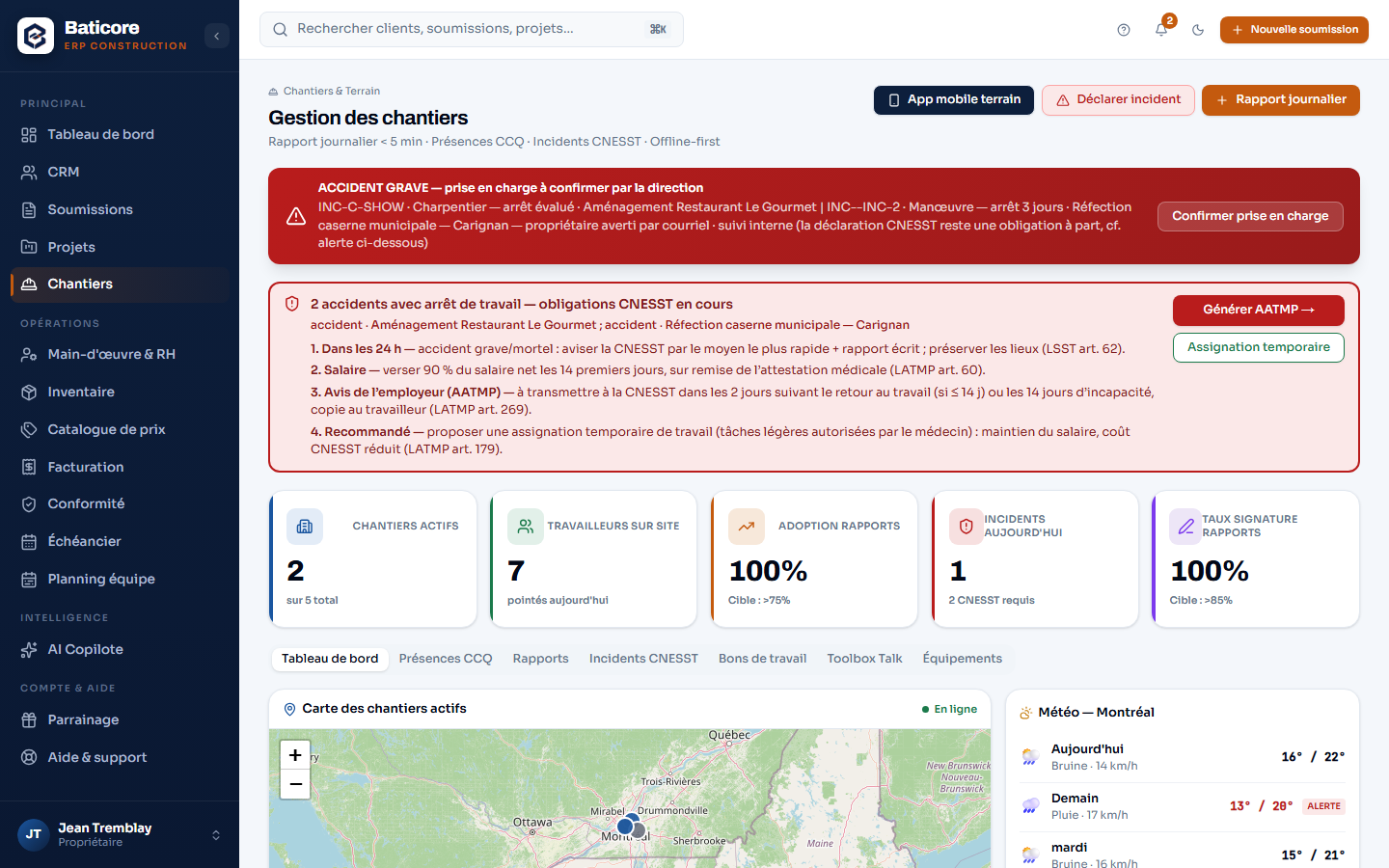
- Dashboard: your active job sites on a map, the workers clocked in today, today’s incidents, equipment by status and the three-day weather of your most recent job site.
- Today’s attendance, site by site: arrival, departure, regular, time-and-a-half and double-time hours; far-away clock-ins are flagged. The foreman or the office clocks an employee in or corrects their day, and the employee is notified.
- Monthly CCQ report prepared from approved hours, checked employee by employee before you upload the file to the CCQ — for the owner and the administrator.
- Daily reports received from the field with their photos, or written at the office, each as a PDF. The photos of submitted reports appear in your client’s portal.
- CNESST incidents: open, investigation, closed; “already declared”, with the date and the number; the employer’s notice (ADR) pre-filled as a PDF; temporary assignment to have authorized by the physician. A daily reminder follows the deadlines, and an incident can’t be closed until the declaration is recorded.
- Work orders: create, assign to an employee, with phase, due date and estimated hours, then actual — overruns stand out.
- Toolbox talk and job-site risks: six risk families to tick per job site, which become the briefing points on the phone; the grid as a PDF; the history of toolbox talks.
- Equipment: record, inspections and compliance, QR labels as PDF, hours of use charged to the project at your rate.
What it doesn't do
The attendance shown is today’s: past days’ hours are in the timesheets (Payroll and HR).
BatiCore prepares the employer’s notice and the CCQ file; you are the one who submits them.
Go further
Who it’s for
Frequently asked questions
Can I see who is on the job site right now?
Yes, from today's clock-ins: arrival, departure, and far-away clock-ins flagged. Reload the page to see the latest arrivals.
What does BatiCore do after a workplace accident?
The owner and the administrator are notified right away, by email and in the bell. The module recalls the obligations — the 24 hours for a serious accident, the first 14 days of salary, the employer's notice —, prepares the ADR and the temporary assignment, and reminds you every day until it's done. It sends nothing to the CNESST.
Does the monthly CCQ report do itself?
It prepares itself, from approved hours. BatiCore flags what blocks, employee by employee, then you upload the file to the CCQ's online services.
Content verified on October 22, 2026.
Try it on your next estimate
Fourteen days, no credit card. We bring in your clients, your employees and your licences with you — you see right away what's slipping.