
Software Construction — Québec
The construction software that knows the RBQ, the CCQ and the CNESST
Estimates, job sites, progress billing with holdback and Québec's own obligations: one tool, hosted in Canada, built for the province's general and specialty contractors.
No credit card. Your data, exportable at any time.
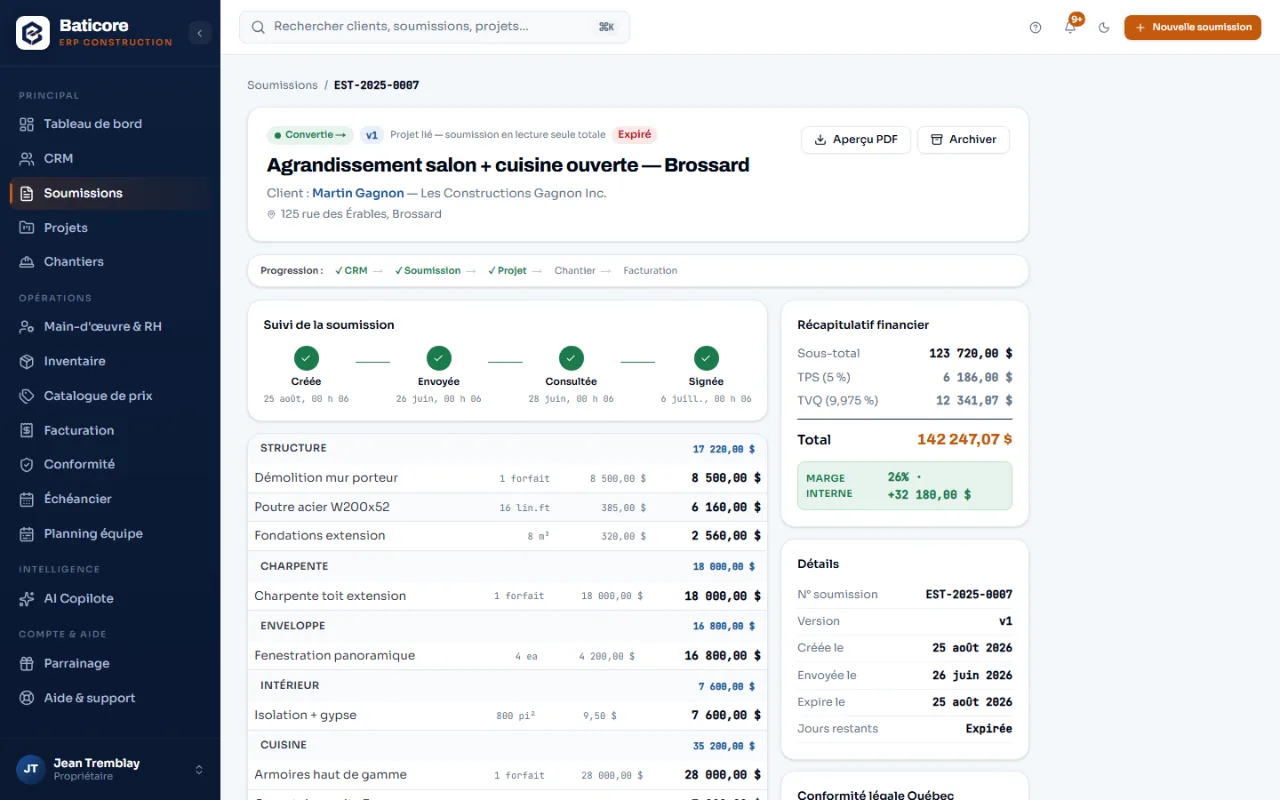
Sections, options the client ticks themselves, internal margin never shown on the PDF.
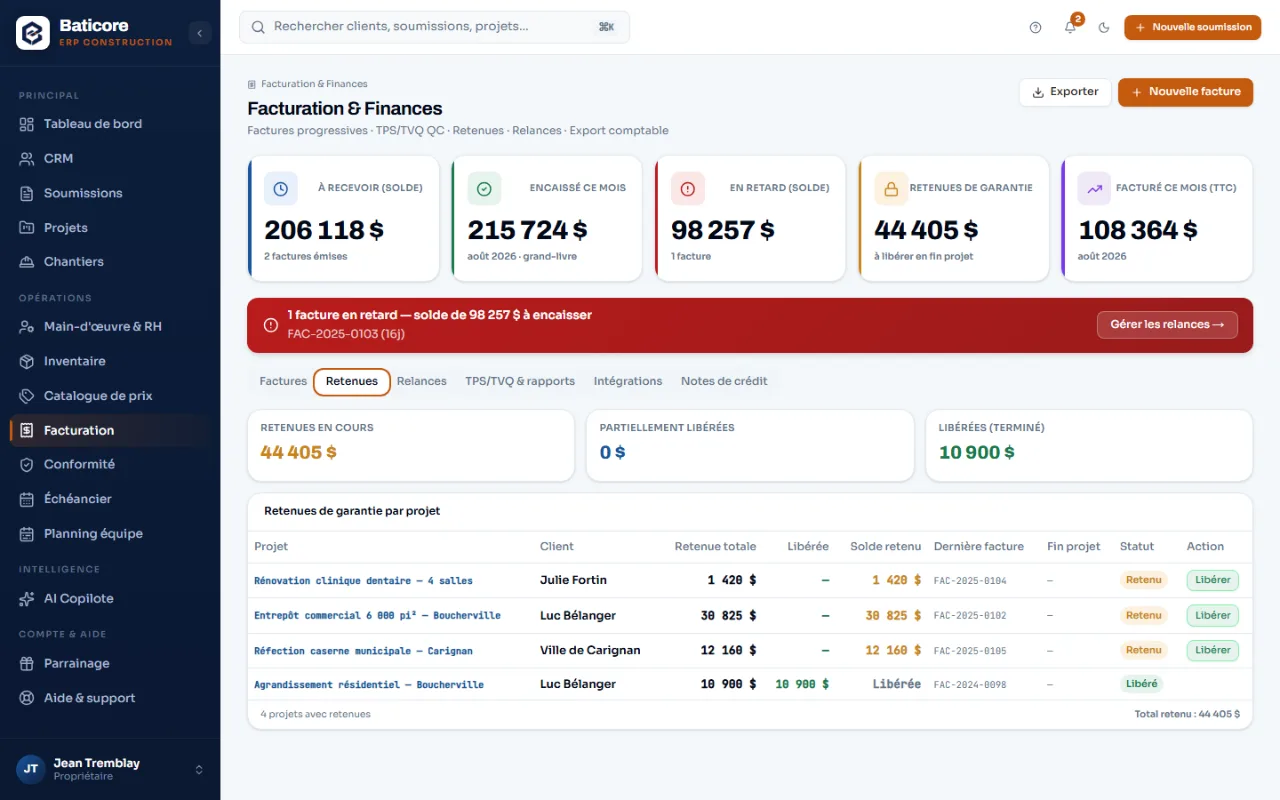
Holdback per project: withheld, released, balance. Tax is deferred to the release on commercial work.
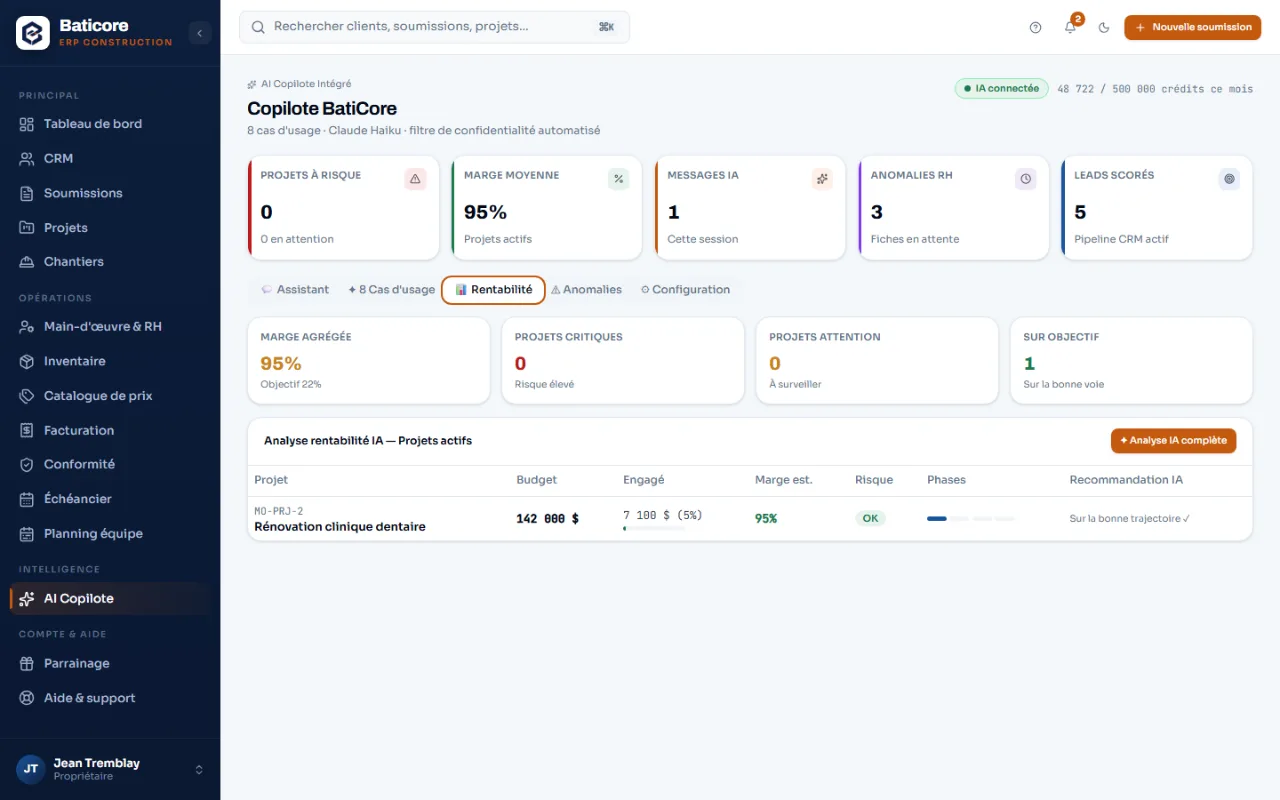
Budget, committed, margin and risk level of every active job site.
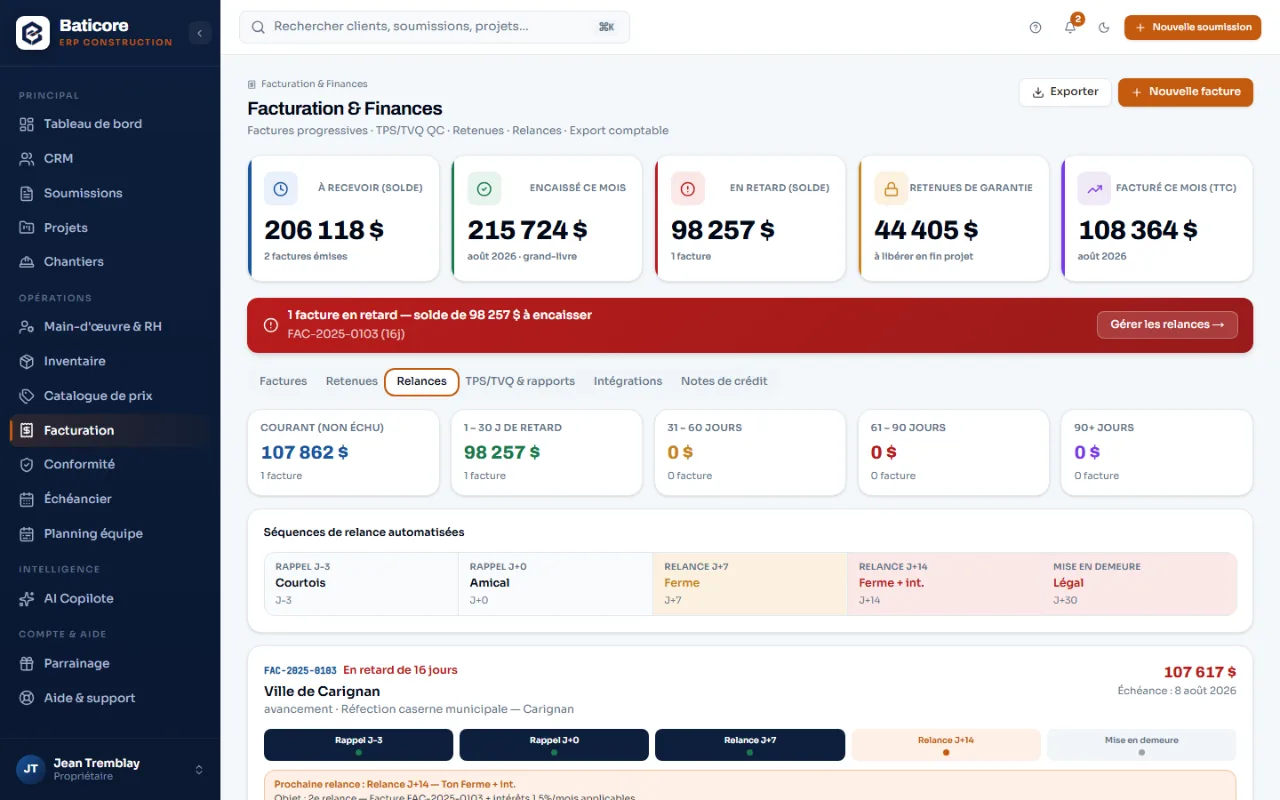
Current, 1–30, 31–60, 61–90, 90+ days. Never an automatic reminder to a commercial owner.
- GST and QST calculated separately
- Electronic signature compliant with the LCCJTI
- Field app that works offline
Who it’s for
Software for your type of job, not software for everyone
A residential renovator and a contractor billing a public owner don't carry the same obligations. BatiCore sets its defaults accordingly.
You coordinate subcontractors, you manage change orders, and you carry the holdback on contracts that last for months.
Subcontractors, change orders, holdbacksResidential renovationKitchens, bathrooms, basements, roofs. Lots of estimates, short cycles, and a client comparing three prices.
Kitchens, bathrooms, basementsNew residential constructionHouses, duplexes, plexes. Long phases, a warranty plan to mention, and buyers who ask questions.
Phases, GCR, warranty planCommercial and institutionalAn owner who pays in 60 or 90 days, an architect who demands a progress table, and a tax you must not advance.
CCA-5B, 45-to-90-day cyclesElectrical, plumbing, HVACA single trade, jobs that look alike, and a price book that should do 80% of the work.
A single tradeRoofing, siding and envelopeWork where a forgotten item eats the margin: the flashing, the gutters, the rotten decking you find once the old membrane is off.
Fast, repeatable estimatesExcavation, foundations and concreteEquipment rented by the day, deliveries to charge to the right job site, and weather that shifts everything.
Equipment, purchase ordersAccountants, CPAs and bookkeepersYour contractor clients hand you boxes of receipts. With BatiCore, they hand you exports.
FP-500, GST34, Acomba exportsFrom the client's first call to the signed contract, without retyping a single line
A prospect enters the pipeline, becomes an estimate, then a project — the same data follows. Describe the job and the AI proposes the structure: sections, items, quantities. Items that exist in your price book are priced at your cost, with the margin of their category.
- Options the client ticks themselves on the portal — the total recalculates live
- Good / better / best: three tiers, one estimate
- Deposit required at signature, with the deposit invoice generated automatically
- LCCJTI electronic signature, with SHA-256 fingerprint and the signer’s IP address
- Automatic follow-ups at day 3, 7 and 14 — switchable off client by client
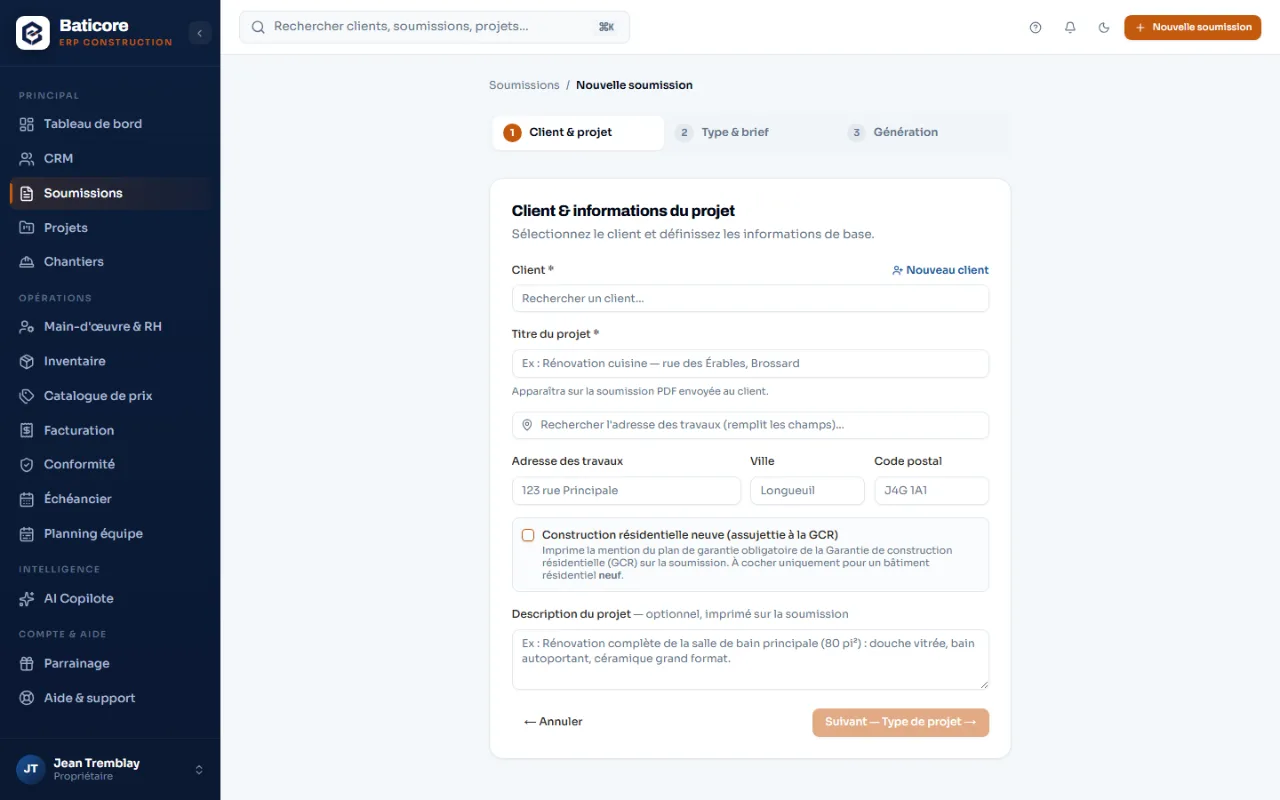
The job site reaches the office the same day, not Friday night
Your crew clocks in, takes photos and reports from the job site — the field app works offline and syncs when the network comes back. Back at the office, every phase shows its budget, its committed costs, its actual spend and its margin.
- Attendance and daily reports attached to the right project
- CNESST incident report, with the AATMP form prepared within the deadlines
- Week-by-week crew scheduling: assignments, time off, conflicts detected
- Purchase orders and receipts charged to the job site, not to a catch-all
- Approved change orders that adjust the contract amount
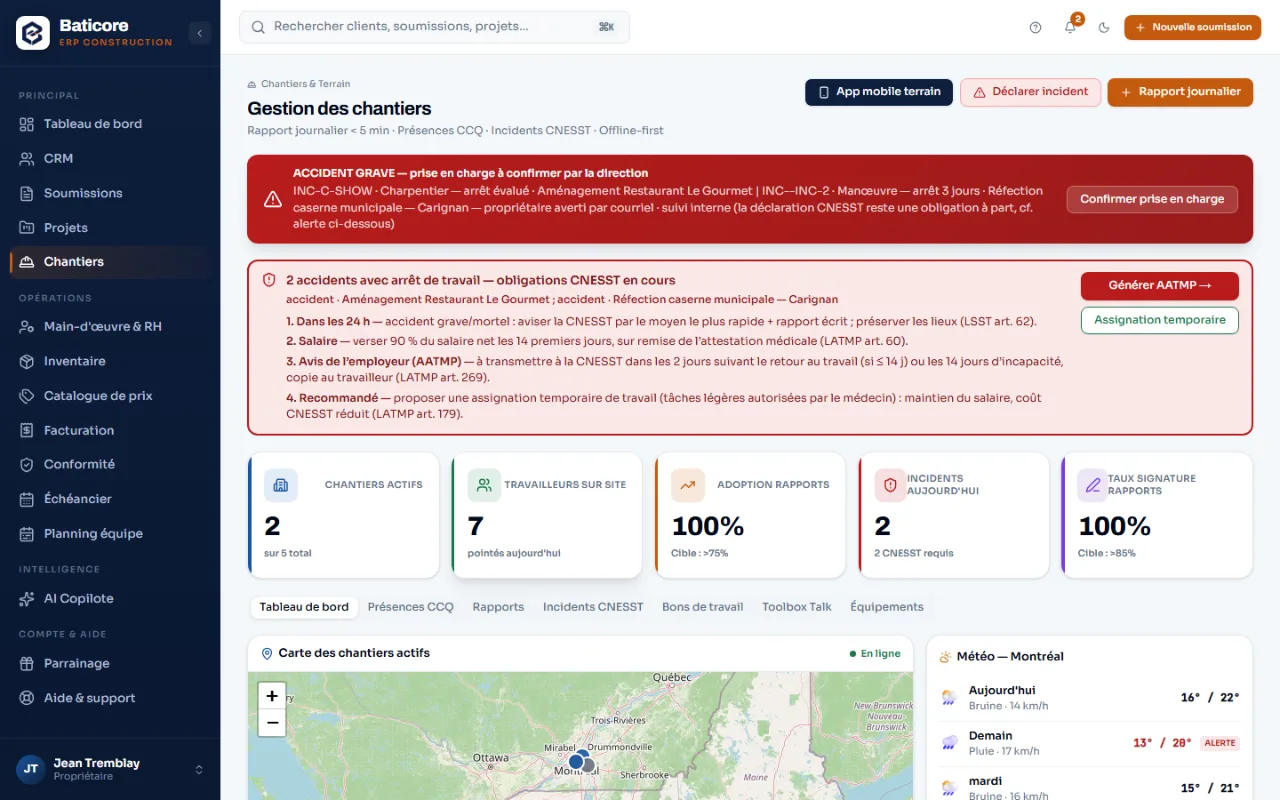
The holdback, calculated the way it must be in Québec
Bill a percentage of progress per phase, withhold the 10%, and let BatiCore decide the tax treatment by project type: immediate on residential, deferred to the release on commercial and institutional. You stop advancing GST and QST on money you haven't collected.
- CCA-5B contract reconciliation table on progress invoices
- Holdback release invoice generated from the Holdbacks tab
- Tiered reminders — switched off by default on commercial and public projects
- Every issued invoice is frozen, archived and SHA-256 hashed
- CSV exports for any period: FP-500, GST34, Acomba
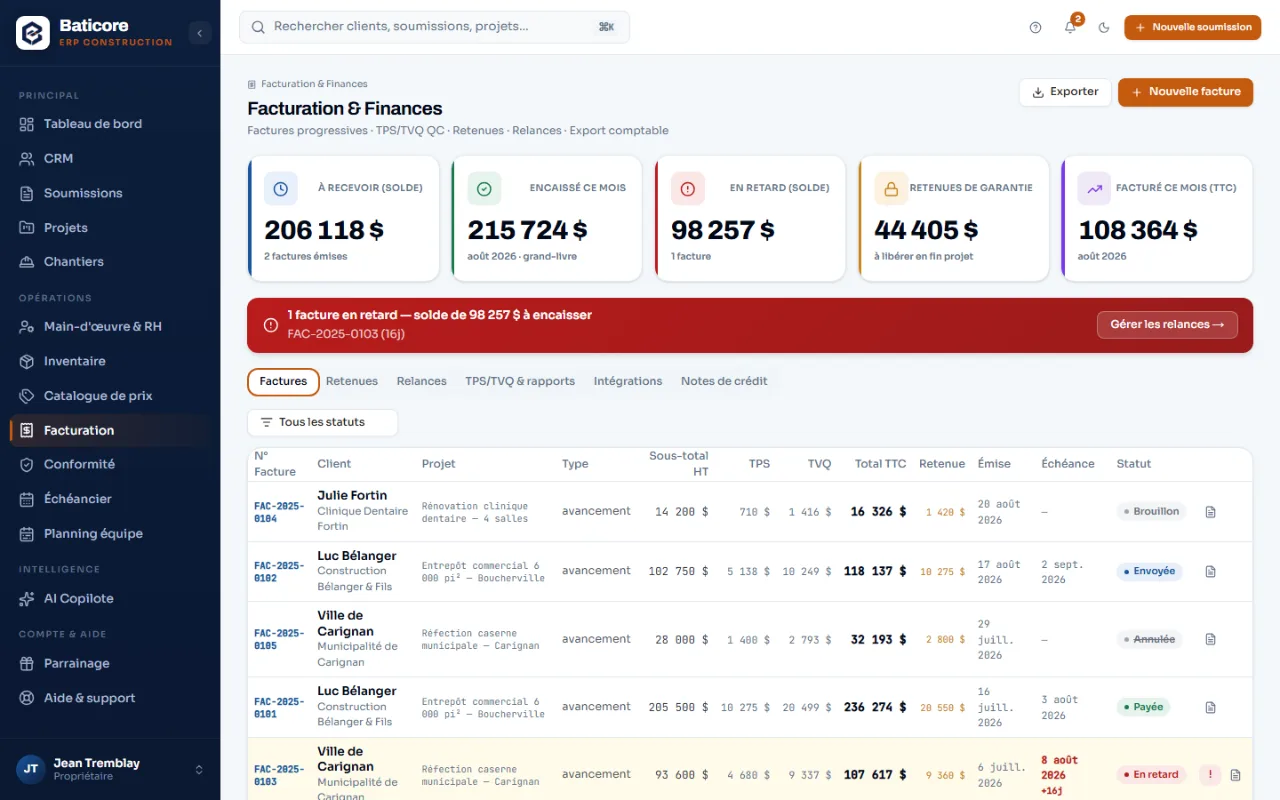
Six bodies can cost you dearly. None of them will remind you.
A competency card that expires in the middle of a long contract. A licence not renewed. A late remittance. These aren't competence errors: they're follow-up that one person cannot keep up with while running five job sites.
- A compliance score, and for every gap the action to take and the time left
- Reminders before every deadline: 45 days for the RBQ licence, 30, 60 and 90 days for cards
- Certifications tracked employee by employee, not in a binder
- Timesheets and payroll preparation under the CCQ collective agreements
- Registers and documents kept for your audits
Two kinds of deadlines cost you money. Only one of them lives in a calendar.
Fixed dates, everyone eventually knows. It's the other ones — the ones that depend on your company, your employees and your contracts — that slip through.
Fixed by the Québec calendar
The same for everyone. BatiCore enters them for you and warns you ahead.
Specific to your business — the expensive ones
Nobody can put them in a generic calendar. They depend on your licences, your employees and your contracts in progress.
All of these dates land in a single schedule, with a reminder before the deadline — not the day after it expired.
Platform
Nineteen modules, one tool
From the first call to the last payment, every step has its module — and they all share the same data: nothing to retype between two.
Compare
What imported software will never do for you
The big American platforms are excellent — on their market. They know neither the holdback, nor the competency card, nor the QST. Here is what that changes in your week.
| What you need here | BatiCore | Imported general-purpose platform |
|---|---|---|
| GST 5% and QST 9.975% calculated separately on the pre-tax amount | Server-side calculation, per-client exemptions | Sales tax to configure by hand |
| holdback with tax deferral on commercial work | Default set by project type | Generic retainage, no tax treatment |
| Progress claim in the format expected here | CCA-5B, computed from the project | American AIA G702 format |
| RBQ licence number printed on estimates and invoices | Automatic mention | Free-text field, easy to forget |
| Warranty plan mention on new residential work | A checkbox, and a reminder if you forget it | Unknown to the software |
| CCQ competency cards tracked employee by employee | Alerts at 90, 60, 30 days | Kept in a spreadsheet on the side |
| CNESST incident report and AATMP form | Filed from the job site | OSHA forms |
| Electronic signature recognized in Québec | Built for the LCCJTI | American ESIGN / UETA framework |
| Data hosted in Canada, Law 25 requirements | Hosted in Montréal | Often hosted in the United States |
| Exports for your accountant here | FP-500, GST34, Acomba | US QuickBooks, IRS forms |
| Documents and support in French, as the Charter requires | Written in French, not translated | English only, or partial translation |
A solid first draft that you correct, because you know your job site better than it does
The copilot is wired to Québec's standards and tax rules. It proposes, flags and drafts; you validate.
Describe the job; the AI proposes the sections, items and quantities. Your price book comes before its own prices.
Indicative prices to validateOn an estimate you build yourself, it flags the items most often forgotten in that kind of work.
Flashing, gutters, rotten decking…Your active projects ranked by overrun risk, with the concrete recommendation to apply.
On your real dataPhotograph the counter receipt or drop the PDF invoice: the AI transcribes the supplier, the lines, the GST and the QST. You check, the office approves.
Draft to approveThe punches and hours that deserve a second look, before payroll goes out.
Before payroll, not afterNBC and NFC codes, CNESST procedures, safety codes — explained in plain language, from the phone.
In the fieldA 0-to-100 conversion score per deal, and the next action to take.
In the pipelineYour raw job-site notes become a professional text ready to send to the client.
One clickWhat the AI receives from your company
The free chat has no access to your database — on purpose. The analyses wired to your figures go through dedicated tabs, and obvious contact details are masked before sending. One exception: the photo of a supplier receipt is sent as is, on your click — an image cannot be masked. That filter reduces the risk without automatically making you compliant with Law 25: it is a shared responsibility.
Straight talk
What BatiCore doesn't do
We'd rather write it plainly than let you assume it.
It isn't accounting software
No general ledger, no accounts receivable, no input tax credit tracking. BatiCore invoices, collects and prepares; you export CSV files to your software or your accountant. The official tax remittance happens outside BatiCore.
It isn't your agent with the authorities
BatiCore tracks your obligations, alerts you before deadlines and prepares your documents. Official filings and transmissions to the RBQ, the CCQ, the CNESST and Revenu Québec remain your responsibility.
BatiCore never collects money on your behalf
The payments you record — cheque, transfer, Interac — are yours, in your accounts. Card payment on the portal isn't open yet; when it is, the money will go to your own Stripe account, never through us.
Payroll is prepared, not paid out
Calculations follow the CCQ collective agreements and produce exports for your accountant or payroll software. BatiCore pays nothing out and transmits nothing officially.
Frequently asked questions
How long does it take to get started?
The time it takes to enter your contact details, your official numbers, your margins and your first price book. During the launch program, we import your clients, employees and licences with you — you see right away what's slipping on the compliance side.
Can I try it without entering my real data?
Yes. The 14-day trial runs on your own data with no commitment, and nothing is billed before you decide. If you'd rather see it first, request a demo: we show you the tool on an account filled with fictitious data.
Do I own my data?
Yes, and it's exportable at any time. It is hosted in Montréal. Even on the entry plan, your invoices download one by one: only the formatted accounting reports depend on the plan, never your data itself.
My public client pays in 60 or 90 days. Will they receive automatic reminders?
No. Automatic reminders are switched off by default on commercial and public projects, and any client can be marked "manual reminders only". The manual reminder — and the formal notice — remain actions you take yourself.
Can I manage two companies in one account?
No: one account equals one company. Branches (Enterprise plan) split the divisions of a single legal entity. Two distinct NEQs require two accounts.
Does the field app work without a network?
Yes. Your crew clocks in, takes photos and reports from the job site even without a signal; everything syncs when the network returns.
Can I trust the prices the AI proposes?
It depends on the line, and you can see which is which. Items recognized in your price book carry your cost. Items missing from your book receive an indicative price to validate — they have no catalogue code. The fuller your price book, the less the AI improvises.
Is the electronic signature legally valid in Québec?
Yes. The signature complies with the LCCJTI: each one records the signer, the date and time, the IP address, explicit consent and a SHA-256 fingerprint of the document — exactly what Québec law requires.
Try it on your next estimate
Fourteen days, no credit card. We bring in your clients, your employees and your licences with you — you see right away what's slipping.