
Basics in every plan · complete from Business
Job costing for construction: the real cost of each project, and its final margin before the end
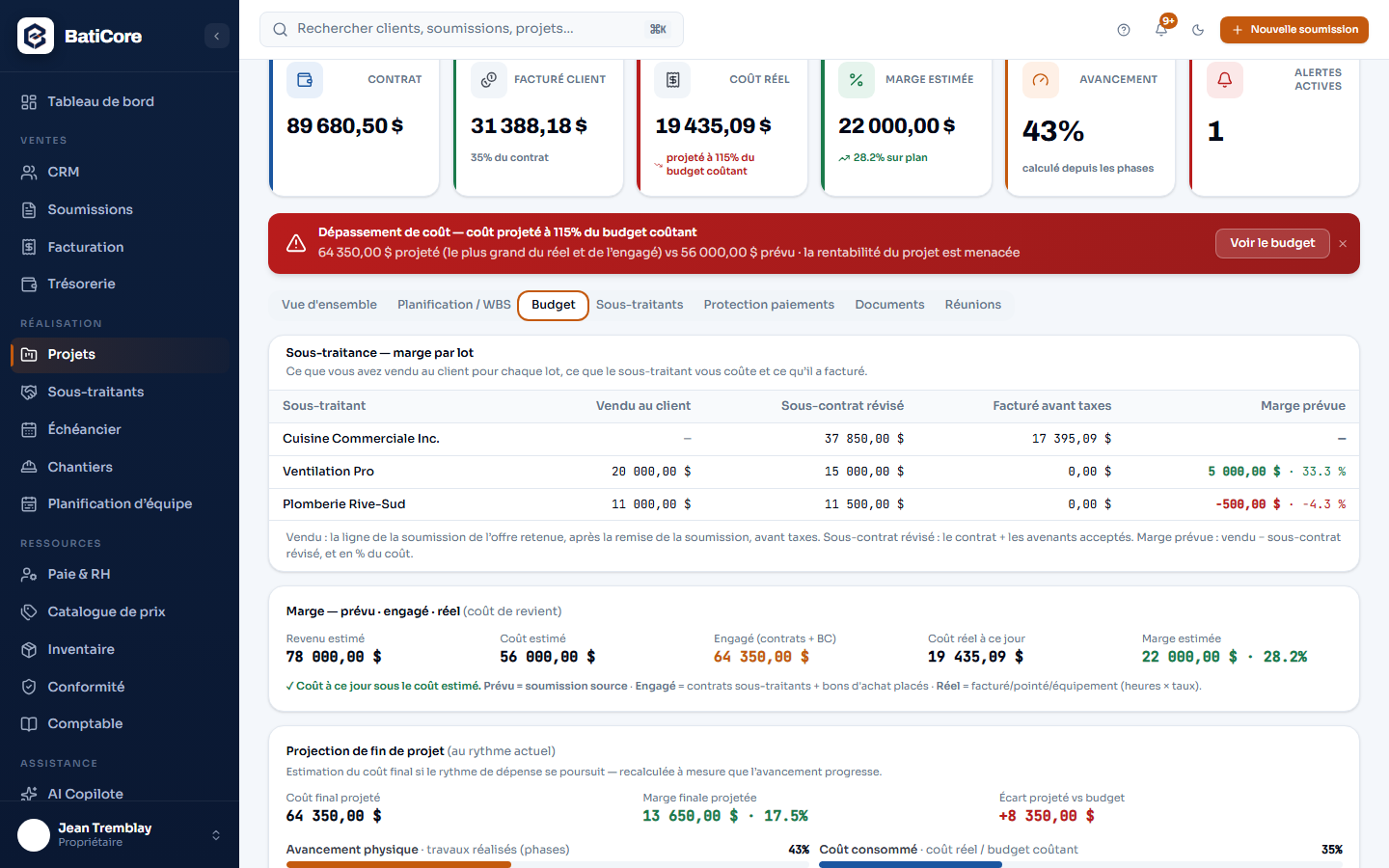
Having billed 90% of the contract says nothing about what the job cost you. BatiCore keeps the two apart: what you bill on one side, what you spend on the other, and the final margin the current pace points to.
Cost tracking is in every plan. Labour cost on the job comes from timesheets, from the Business plan: with Starter, the screen shows a “partial actual cost”, with no margin or overrun alert.
What the module does
- Revenue and costs kept apart: the contract with its approved change orders and the amount billed to the client on one side, actual cost on the other. A billing alert is never mistaken for a cost overrun.
- Actual cost adds up labour from approved timesheets, materials from purchase orders and validated expenses, equipment by hours of use and subcontracting invoiced, always before taxes.
- The counter receipt, photographed: the AI reads the supplier, the amounts, the GST and the QST. The site supervisor enters it, the office validates; nothing reaches cost without validation.
- Planned, committed, actual, by category: planned comes from your estimate, refused options excluded; committed counts subcontracts and purchase orders already placed, before the invoice even arrives.
- The projected final cost: at the current spending pace, the expected final margin in dollars and percent, and the variance from your budget. Under 10% progress it sticks to the budget: too early to extrapolate.
- Work progress and budget consumed, side by side: a gap of 20 points is flagged. Spending faster than you progress is the overrun announcing itself.
- An alert when projected cost reaches 90% of the cost budget, a red banner at 100%. Projected cost is the larger of actual and committed, never their sum: a purchase doesn’t count twice.
- Phase by phase: budget, progress and actual cost, and the hours of each phase. From the Business plan, the margin of each subcontracting package, change orders included.
- The AI Copilot ranks your active projects by overrun risk, with the concrete step to take.
Go further
Who it’s for
Frequently asked questions
What is the difference between billed and actual cost?
Billed is what you have claimed from your client; actual cost is what the job has cost you so far. You can have billed 90% of the contract while having already spent 120% of the budget. BatiCore shows them separately, with two distinct alerts: one suggests a change order, the other tells you profitability is at risk.
How is the final cost projected?
By dividing actual cost by the physical progress of the work, measured by phase. At 40% of the work for 60% of the budget spent, the current pace leads over budget, and the screen says so. Under 10% progress, the projection sticks to the planned budget: the start of a job is not a trend. It is only as good as the progress entered.
Do I need an estimate to track profitability?
Yes, to compare against plan. Planned cost comes from the lines of the estimate converted into the project. A project created without an estimate tracks its contract, its billed amount and what remains to bill, but has no cost budget to compare actual cost against, and the screen doesn't invent a margin.
What do I see on the Starter plan?
Subcontracting, materials, equipment and every expense you enter go into actual cost. Labour comes from timesheets, from the Business plan. On Starter, the indicator is therefore called “partial actual cost” and shows no margin or overrun alert: computed on a truncated cost, they would reassure you wrongly.
Content verified on November 4, 2026.
Try it on your next estimate
Seven days, no credit card. We bring in your clients, your employees and your licences with you — you see right away what's slipping.